Why Do My YouTube Videos Have 0 Views? 9 Reasons + Fixes
Your YouTube video has 0 views? Before blaming a shadowban, check visibility, format, topic, packaging, timing, and your channel baseline. Here is a practical diagnosis.
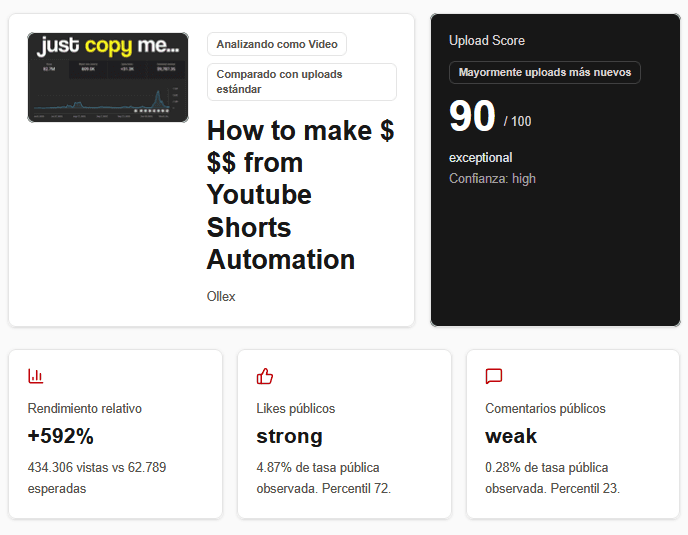
Upload Score
unusual drop vs recent baseline
Format
Short
Baseline
same channel
Quick answer
No - 0 views does not automatically mean you are shadowbanned. A video can sit at zero because it is not actually public, because YouTube has not found the right viewers for it yet, because the topic or packaging is a poor fit, or because you are judging it too early or against the wrong videos. The fastest way to diagnose it is to compare the upload with similar videos from your own channel - same format, similar age, similar topic - instead of comparing it with a viral outlier.
If you uploaded a video or Short, refreshed YouTube Studio ten times, and still see a big fat “0,” it is easy to jump to the worst conclusion: “YouTube killed my channel,” “the algorithm is not pushing me,” or “I must be shadowbanned.”
Sometimes there is a real problem. But the number zero by itself does not tell you what the problem is. You need context.
This guide gives you a practical order of operations: first rule out technical issues, then compare the video to the right benchmarks, and only then decide whether the topic, title, thumbnail, hook, or audience fit needs work.
1. First: make sure the video is actually public
This sounds obvious, but it is the fastest thing to rule out. A private video cannot appear in YouTube search, recommendations, or your public channel. An unlisted video can be watched by people who have the link, but it generally will not be surfaced like a normal public upload.
Open YouTube Studio and check the video under Content > Visibility. If your goal is organic discovery, the video should be Public.
Do this before anything else
If the video is Private, Unlisted, still processing, blocked, restricted, or scheduled for later, do not waste time “fixing the algorithm.” Fix the publishing state first.
2. “0 views” is not the same thing as “YouTube refuses to recommend me”
YouTube recommendations are personalized. The platform tries to match each viewer with videos they are likely to watch and enjoy. That means there is no single switch called “push this video.” A video can get very little distribution because YouTube has not found a strong audience match, because competing videos are performing better for those viewers, or because early viewer behavior does not give the system a good reason to expand distribution.
For Shorts, YouTube specifically says ranking is based on viewer personalization and performance signals such as whether people choose to watch, how long they watch, and whether they keep watching to the end. That is very different from “the algorithm randomly decided to hate my channel.”
The important distinction is this: low reach is an outcome. Your job is to diagnose why the video earned less reach than comparable uploads.
3. If it is a Short, compare it with Shorts - not your long-form videos
One of the easiest ways to misread YouTube performance is mixing formats. A Short and a 12-minute video are distributed differently, consumed differently, and judged by different viewer behaviors. Comparing raw views across them can create a fake crisis.
If a Short has 200 views, the useful question is not “why does my 20-minute video have 4,000?” The useful question is “what did my last 10 to 15 Shorts do at the same age?”
- Compare Short vs Short and long-form vs long-form.
- Compare similar video age: 6 hours vs 6 hours, 24 hours vs 24 hours, 7 days vs 7 days.
- Prefer recent uploads over a viral video from eight months ago.
- If possible, compare similar topics or series.
Short baseline
Compare Short vs Short
Last 12 Shorts
Long-form baseline
Kept separate
0 mixed uploads
4. Your topic may be the problem - even if the video itself is “good”
Creators often improve the wrong thing. They rewrite the title twelve times, add hashtags, change the description, and blame the thumbnail - when the real problem is that the topic has weak demand for their current audience.
A beautifully edited video about a subject your viewers do not care about can still underperform. This is especially common when a channel changes niche, experiments with a very specific topic, or publishes something that does not match what recent viewers subscribed for.
Ask: if someone enjoyed my last five successful videos, would this new topic feel like an obvious next click? If the answer is “not really,” the bottleneck may be audience fit before it is thumbnail design.
5. For long-form videos, weak packaging can stop the click
For normal YouTube videos, the title and thumbnail are your packaging. If the video gets impressions but very few clicks, packaging becomes a much stronger suspect. A vague title, a thumbnail with no clear focal point, or a promise that looks identical to every competitor can all reduce the chance that viewers choose your video.
But be careful: “bad views = bad thumbnail” is still too simplistic. If the video barely received impressions, you do not have enough evidence to blame click-through rate alone. Diagnose the stage of the funnel before changing the asset.
Useful mental model
Reach problem: not enough of the right people are seeing it. Click problem: people see it but do not choose it. Watch problem: people choose it but leave quickly. These are different problems and they need different fixes.
6. For Shorts, the first seconds matter more than thumbnail obsession
A custom thumbnail can still matter when a Short appears on your channel page, search, or other surfaces. But inside the Shorts feed, the viewing decision is heavily driven by what happens immediately on screen. If viewers swipe away, the Short has a weak chance to earn broader distribution.
That is why a Short stuck near zero or very low views should make you review the opening moment: Is the first frame understandable? Is there movement? Is the premise obvious without context? Does the first sentence create a reason to keep watching?
Do not turn this into generic “make a better hook” advice. Compare the opening of the weak Short with openings from your own Shorts that performed better. Look for a concrete difference.
7. Your channel baseline matters more than an arbitrary “good views” number
This is the most important part - and the reason absolute view counts are often misleading.
Imagine a Short has 500 views. Is that bad? There is no universal answer.
Example
If your last 15 Shorts usually get 300 to 700 views, 500 views may be completely normal. But if your last 15 comparable Shorts average 8,000 views and the new one stops at 500, that is a meaningful drop worth investigating.
Your recent baseline gives the number context. A small channel can have a healthy 500-view video. A larger or recently viral channel can have a genuine flop at the same number. The correct benchmark is usually your own comparable history, not a random creator on Reddit.
Recent comparable videos
300-700 views
500 views - within normal range
Recent baseline
~8,000 views
500 views - significant underperformance
8. “My channel is dead” is usually too big a conclusion from one upload
One bad upload feels personal because creators watch the numbers in real time. But a channel is not a single video. Topics fluctuate. Competition changes. Viewer interest changes. Some uploads simply miss.
Before deciding your channel is dead, look for a pattern across multiple comparable uploads. Did only one video fail? Did five Shorts in a row get less reach than your recent norm? Did long-form drop while Shorts stayed stable? Did the decline start after a topic change? Patterns are useful. Panic is not.
If several comparable videos show the same decline, then you have a stronger reason to investigate channel-level changes. If only one video is weak, treat it as a video-level diagnosis first.
9. Do not delete and re-upload just because you see zero
Deleting a video immediately destroys the cleanest evidence you have: how that upload performed over time. Re-uploading the same thing repeatedly can also make it harder to learn what changed, because you are resetting the experiment without understanding the original result.
Unless there is a clear publishing mistake - wrong file, broken audio, private visibility, major typo, or similar - collect enough data to diagnose the problem before you erase it.
A 10-minute diagnosis for a YouTube video stuck at 0 views
Use this order. It prevents you from changing five things at once and learning nothing.
- 1Check visibility and restrictions. Confirm the upload is Public and playable from another account or incognito window.
- 2Identify the format. Is it a Short or long-form video? Keep those comparisons separate.
- 3Match the age. Compare performance at a similar number of hours or days after publishing.
- 4Build a recent baseline. Look at roughly the last 10-15 comparable uploads, not your all-time best video.
- 5Check the topic. Does this subject match what your recent audience has chosen to watch?
- 6Check packaging. For long-form, evaluate title + thumbnail. For Shorts, review the opening seconds and clarity of the premise.
- 7Look at engagement in context. Likes and comments can be useful, but a tiny sample can be misleading.
- 8Use YouTube Studio when available. Impressions, CTR, audience retention, “viewed vs swiped away,” and traffic sources help identify which stage is failing.
- 9Do not make five changes at once. Pick the most likely bottleneck, change one variable, and compare the next upload.
How CALLS OFF helps you answer “did this video actually flop?”
The hardest part of creator analytics is not seeing numbers. It is knowing what the numbers mean for your channel.
CALLS OFF Creator Doctor is built around that problem. Paste a public YouTube video or Short and compare it against your own recent uploads instead of an arbitrary “good” benchmark from the internet.
- Separates Shorts from long-form comparisons.
- Adjusts comparisons for video age so a new upload is not unfairly compared with an old one.
- Compares public engagement such as likes and comments in context.
- Uses your recent channel baseline to flag whether performance looks normal or unusually weak.
- Helps you spot when the real issue may be reach, format mix, or an unusual result - before you change everything.
Public analysis has limits: without your private YouTube Analytics data, no external tool can see every internal metric such as full retention or impressions for your channel. That is why a useful diagnosis should be clear about what it knows and what it does not.
Stop guessing.
Paste your video and compare it with your own channel.
Try it free
Paste any public YouTube video or Short into CALLS OFF and check whether it is actually underperforming relative to your own recent uploads. No login needed for the first public analysis.
What if the video has likes but almost no views?
A high like rate on a tiny number of views can look impressive, but it does not prove the video should have received more distribution. Ten views and four likes is a 40% like rate - but it is still a sample of ten people.
This can happen when the small group that found the video genuinely liked it, while the video still had weak reach or weak click/watch signals at scale. Treat engagement as one piece of evidence, not the entire diagnosis.
What if all of my recent videos suddenly lost views?
That is more interesting than one flop. Compare the decline by format and by date. If both Shorts and long-form dropped at the same time, investigate broader changes: topic, upload cadence, audience shift, seasonality, or changes in where traffic normally comes from. If only one format dropped, diagnose that format separately.
The key is to find the first point where the baseline changed. “My channel died” is too vague to fix. “My last six Shorts are getting 70% fewer views than my previous 15 Shorts while long-form stayed stable” is a real diagnosis you can work with.
FAQ: YouTube videos and Shorts stuck at 0 views
Does 0 views mean I am shadowbanned?
No. A zero view count alone is not evidence of a shadowban. First rule out visibility or restriction issues, then compare the upload with similar videos from your own channel. If multiple comparable uploads show an unusual pattern, investigate the pattern rather than assuming a hidden penalty.
How long does YouTube take to show a Short?
There is no single guaranteed time at which every Short receives distribution. Shorts are matched to viewers based on personalization and performance. Judge the result against your own recent Shorts at a similar age instead of expecting every upload to move immediately.
Why does my Short have likes but very few views?
The small number of people who saw it may have liked it, while reach remained limited. A strong like rate on a tiny sample does not automatically mean YouTube should distribute the Short widely. Look at watch behavior and compare with your normal baseline.
Should I delete Shorts with low views?
Usually not just because the view count is low. A weak upload gives you data. Delete or replace it when there is a real publishing problem, not as a reflex every time a video underperforms.
Do Shorts hurt my long-form videos?
Do not assume one format is “killing” the other just because the view counts are different. Analyze Shorts and long-form separately first. Their consumption patterns and recommendation surfaces are different, so mixing them can create misleading conclusions.
Why does a new video not appear in YouTube search?
Confirm that the video is Public. Public videos can appear in search, while private videos cannot and unlisted videos are not surfaced like normal public uploads. Search visibility can also depend on relevance and competition, so being public does not guarantee a high ranking.
Why does YouTube show one Short and not another?
Different Shorts can match different viewers and receive different performance signals. Topic, opening seconds, viewer choice, watch duration, and audience fit can all differ even when the same creator posts both videos.
Why did my YouTube views suddenly drop?
Look for a repeatable pattern. Compare recent videos by format, age, topic, and baseline. A drop across several comparable uploads is much more meaningful than one weak video.
The bottom line
If your YouTube video has 0 views, do not start by asking, “How do I trick the algorithm?” Start with a better question: “Is this result actually abnormal for this type of video on my channel?”
Check visibility. Compare the right format. Match video age. Use your recent baseline. Then inspect topic, packaging, opening, and private Studio metrics if you have them. That sequence turns “YouTube hates me” into a problem you can actually diagnose.
And if you want a fast first-pass check, paste the video into CALLS OFF Creator Doctor and compare it with your own recent uploads before you change everything.
Sources and further reading
- YouTube Help - Change video privacy settingssupport.google.com/youtube/answer/157177
- YouTube Help - How YouTube recommendations worksupport.google.com/youtube/answer/16089387
- YouTube Help - Search & discovery tips for Shortssupport.google.com/youtube/answer/11914225